Introduction
This article demonstrates the SD-WAN traffic steering strategy called “Remote Health Signaling”.
In this strategy, the Spoke firewalls continuously ping the Hub firewall’s loopback IP address. These ping packets also carry SD-WAN health information, allowing the Hub to become aware of which PVN tunnels to the spokes are the best or most preferred based on the priority value inserted into the routes received from the Spokes.
- If the Spoke determines the ping to the hub is within the defined SLA parameters, the Spoke will attach an additional route attribute to it’s own advertised prefix with an attractively low (and therefore more preferred) value. This happens for each VPN tunnel between the Spokes and the Hub.
- Similarly, if it falls out of SLA, it will attach a more “expensive” route value, making it a less preferred path to the Spoke prefix, but still a path which could be usable.
- When each VPN is wthin SLA, the route priorities can be staggered so that when some or all paths are in SLA, it will ensure the preferred paths are used.
- As an example, if we have VPN tunnels over fibre, LTE and Starlink, you can attach the lowest route priority to the VPN tunnel over fibre.
The topology used to demonstrate this feature is shown below:
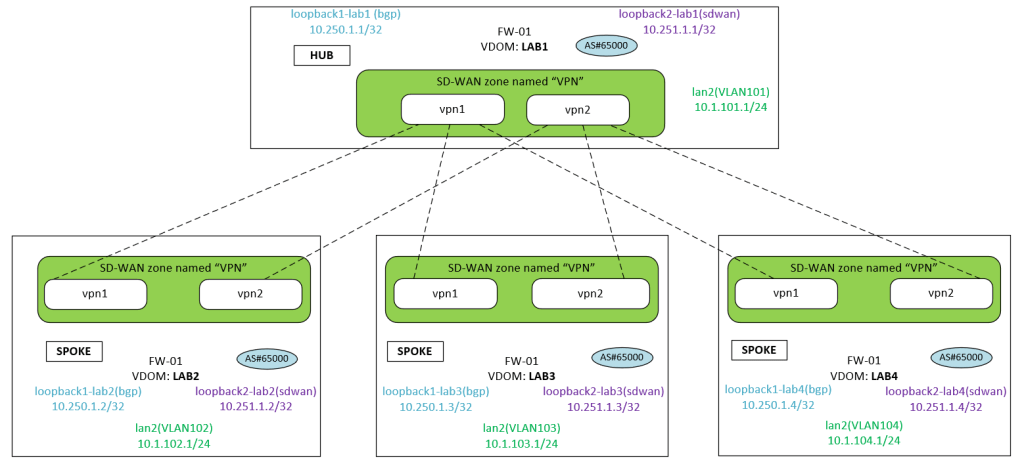
Configuration – Hub
The following unique configuration is implemented on the Hub.
- Both vpn1 and vpn2 interfaces are placed into an SD-WAN zone.
- The following additional configuration is added for the Hub to participate in remote health signaling:
BGP:config router bgpset recursive-inherit-priority enableSD-WAN:config system sdwan config health-check edit "Remote_health_check" set detect-mode remote <--- use the spoke's SLA value set sla-id-redistribute 1 <--- check this set members 1 2 config sla edit 1 set link-cost-factor remote <--- check this next end next endend
Configuration – Spokes
The following unique configuration is implemented on the Spokes.
- Both vpn1 and vpn2 interfaces are placed into an SD-WAN zone.
- SD-WAN
- config system sdwan
- config members
- edit 1
- set priority-in-sla 60
- set priority-out-sla 120
- next
- edit 2
- set priority-in-sla 70
- set priority-out-sla 140
- next
- edit 1
- end
- config members
- config health-check
- edit “HUB”
- set embed-measured-health enable
- set sla-id-redistribute 1
- edit “HUB”
- config system sdwan
Full Configuration
The sections below shows the full configuration so you can understand the overall configuration. I have used BGP on Loopback as my site to site VPN type.
Hub – Full Configuration
IPSec VPN
FW-01 (LAB1) # show vpn ipsec phase1-interface config vpn ipsec phase1-interface edit "vpn1-hub1" set type dynamic set interface "LAB1-VLAN211" set ike-version 2 set peertype any set net-device disable set exchange-ip-addr4 10.250.1.1 set proposal aes256-sha256 set add-route disable set dpd on-idle set dhgrp 21 set auto-discovery-sender enable set network-overlay enable set network-id 1 set transport auto set psksecret ENC xxxxxxx set dpd-retryinterval 5 next edit "vpn1-hub2" set type dynamic set interface "LAB1-VLAN212" set ike-version 2 set peertype any set net-device disable set exchange-ip-addr4 10.250.1.1 set proposal aes256-sha256 set add-route disable set dpd on-idle set dhgrp 21 set auto-discovery-sender enable set network-overlay enable set network-id 2 set transport auto set psksecret xxxxxxx nextendFW-01 (LAB1) #
BGP:
FW-01 (LAB1) # show router bgpconfig router bgp set as 65000 set router-id 10.250.1.1 set keepalive-timer 15 set holdtime-timer 45 set ibgp-multipath enable set additional-path enable set recursive-next-hop enable set recursive-inherit-priority enable <---- added for Remote Health Signaling config neighbor-group edit "spoke-sites" set advertisement-interval 1 set next-hop-self enable set soft-reconfiguration enable set interface "loopback1-lab1" set remote-as 65000 set connect-timer 1 set update-source "loopback1-lab1" set additional-path send set route-reflector-client enable next end config neighbor-range edit 1 set prefix 10.250.1.0 255.255.255.0 set neighbor-group "spoke-sites" next end config network edit 1 set prefix 10.1.100.0 255.255.255.0 next edit 2 set prefix 10.1.101.0 255.255.255.0 next edit 3 set prefix 10.251.1.1 255.255.255.255 next endendFW-01 (LAB1) #
SD-WAN:
config system sdwan set status enable config zone edit "VPN" next end config members edit 1 set interface "vpn1-hub1" set zone "VPN" next edit 2 set interface "vpn1-hub2" set zone "VPN" next end config health-check edit "Remote_health_check" set detect-mode remote <--- to accept remote health check signaling on the hub set sla-id-redistribute 1 <---- what is this? set members 1 2 config sla edit 1 set link-cost-factor remote <--- not sure next end next endend
Spokes – Full Configuration
IPSec VPN
I use the localid value on the spokes phase1 configuration. When you do this, it populates a user friendly name on the VPN tunnel list when you view the tunnels on the hub.
config vpn ipsec phase1-interfaceedit "To_Hub"set localid "Branch_Office_A"nextend
SD-WAN:
FW-01 (LAB2) # show system sdwan config system sdwan set status enable config zone edit "VPN" next end config members edit 1 set interface "LAB2-VLAN221" set zone "Internet" set gateway 10.252.1.9 next edit 2 set interface "LAB2-VLAN222" set zone "Internet" set gateway 10.252.1.13 next edit 3 set interface "vpn1" set zone "VPN" set source 10.251.1.2 set cost 10 set priority 10 set priority-in-sla 60 <----- When the ping to the hub loopback is within SLA, apply the route metric of 60 set priority-out-sla 120 <----- When the ping to the hub loopback is out of SLA, apply the route metric of 120 next edit 4 set interface "vpn2" set zone "VPN" set source 10.251.1.2 set priority 10 set priority-in-sla 70 <----- When the ping to the hub loopback is within SLA, apply the route metric of 70 set priority-out-sla 140 <----- When the ping to the hub loopback is out of SLA, apply the route metric of 140 next end config health-check edit "HUB" set server "10.251.1.1" set update-static-route disable set embed-measured-health enable <----- When the firewall pings the hub, insert the priority-in/out-sla metric as well. set sla-id-redistribute 1 <----- to be confirmed set members 3 4 config sla edit 1 set link-cost-factor latency jitter packet-loss set latency-threshold 100 set jitter-threshold 150 set packetloss-threshold 10 next end next end config service edit 1 set name "To_LAB1_LAN" set mode sla set dst "LAB1_LAN" set src "all" config sla edit "HUB" set id 1 next end set priority-members 3 4 next endendFW-01 (LAB2) #
BGP:
FW-01 (LAB2) # show router bgpconfig router bgp set as 65000 set router-id 10.250.1.2 set keepalive-timer 15 set holdtime-timer 45 set ibgp-multipath enable set recursive-next-hop enable set tag-resolve-mode merge config neighbor edit "10.250.1.1" set advertisement-interval 1 set soft-reconfiguration enable set interface "loopback1-lab2" set remote-as 65000 set connect-timer 1 set update-source "loopback1-lab2" next end config neighbor-group edit "spoke-sites" set advertisement-interval 1 set next-hop-self enable set soft-reconfiguration enable set interface "loopback1-lab2" set remote-as 65000 set update-source "loopback1-lab2" set route-reflector-client enable next end config neighbor-range edit 1 set prefix 10.250.1.0 255.255.255.0 set neighbor-group "spoke-sites" next end config network edit 1 set prefix 10.1.102.0 255.255.255.0 next edit 2 set prefix 10.251.1.2 255.255.255.255 next endendFW-01 (LAB2) #

